Install
Install clog
Homebrew
brew install thinkwright/tap/clog
Curl
curl -sSL https://thinkwright.ai/clog/install | sh
Go Install
go install github.com/thinkwright/claude-chronicle/cmd/clog@latest
From Source
git clone https://github.com/thinkwright/claude-chronicle && cd claude-chronicle && make build

A chronicle of everything
Claude Code is doing on your system.

Claude Chronicle (clog) is a looking glass for Claude Code activity on your machine. Full-text search, regex watchlists, live tailing, structured filters, and memory viewing in a single binary.

Zero config Single binary Full-text search Live tailing Memory & Hooks
clog
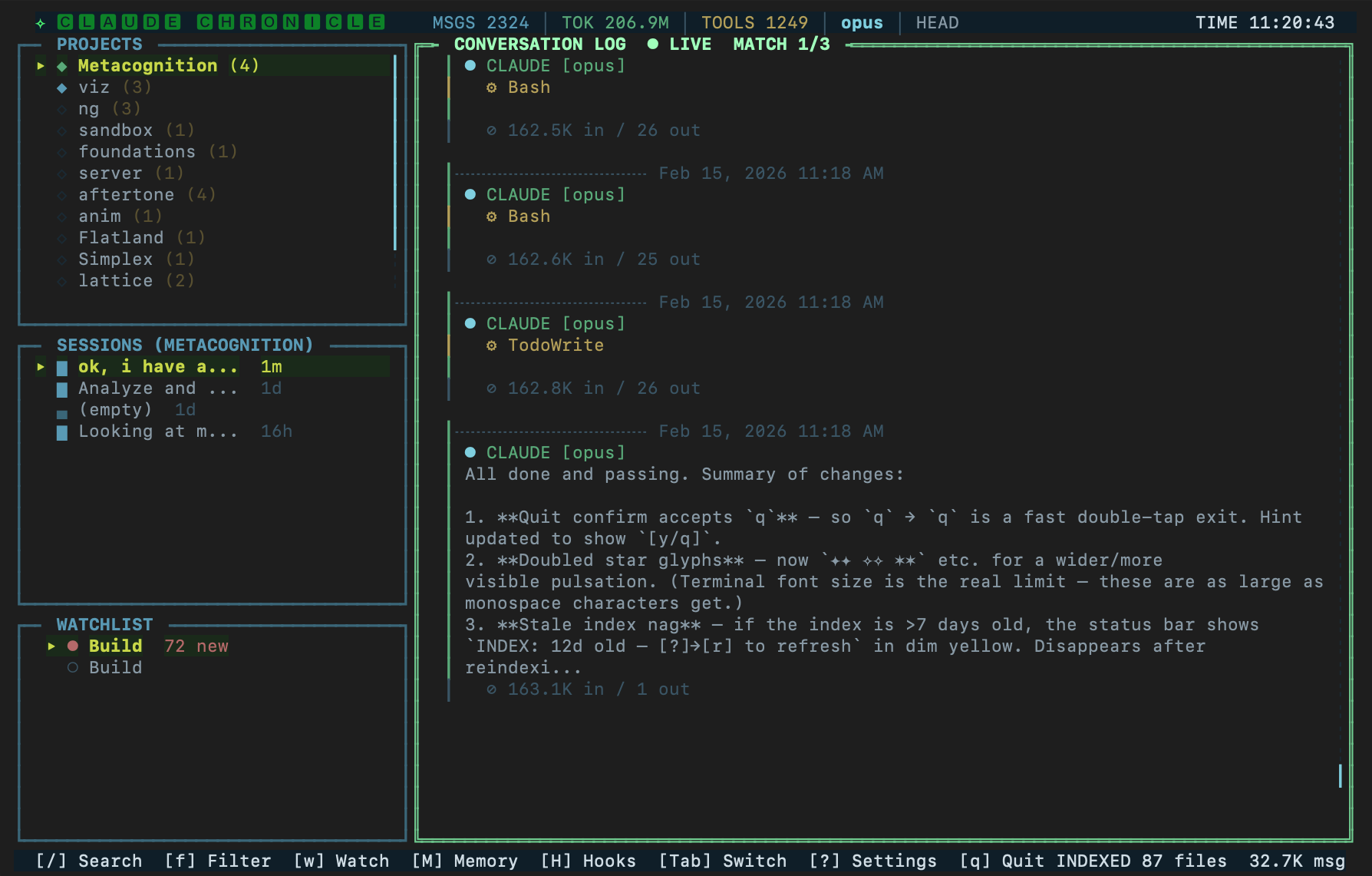
Claude Chronicle terminal dashboard showing projects, sessions, conversation log, and watchlist
Multi-Pane Dashboard
Projects, sessions, watchlist, and conversation detail in a split layout. Memory and Hooks introspection a hotkey away.
Full-Text Search
SQLite FTS5-powered search across all conversation content. Phrase matching, boolean operators, scope switching.
Watchlist
Define regex patterns to monitor across all conversations. Unseen matches light up in real time.
Live Tailing
Auto-scrolls as Claude Code writes. Filter, search, and traverse the full conversation log in real time.

How It Works

Discovers your Claude Code projects
Scans ~/.claude/projects/ for all JSONL conversation files. Auto-detects project names, session counts, and last-modified times.
Indexes everything with SQLite + FTS5
On first launch, parses all conversation files and builds a full-text search index. Incremental updates keep the index current as new conversations happen.
Renders a TUI dashboard
Built with Go + Bubbletea. Multi-pane layout with custom box-drawing borders, model-colored indicators, token counts, and scrollbars.
Watches for changes in real time
File watchers detect new content as Claude Code writes. The conversation log auto-scrolls, watchlist patterns fire, and the index stays fresh.

What You See

Left Column
Projects & Sessions

All your Claude Code projects with recency indicators. Select a project to see its sessions sorted by last modified. Session size bars show relative conversation length.

Right Column
Conversation Log

Full conversation with user prompts, assistant responses, tool calls, and token usage. Color-coded message types, model-colored dots, and live-tail mode for active sessions.

More

  • Conversation filters — filter the log by message type, model, tool usage, or token count with f
  • Project memory viewer — browse Claude Code's auto-generated MEMORY.md files in a centered modal with M
  • Scrollbars — proportional scrollbar indicators on every pane
  • Model indicators — color-coded dots distinguish Opus, Sonnet, and Haiku at a glance
  • Token accounting — input/output token counts per message and per session
  • Keyboard-driven — vim-style navigation, Tab cycling, and single-key actions throughout